
Salesloft Dialer: From Call Tasks to Logged Outcomes
Work Salesloft call tasks with Trellus, then check the Person, saved outcome, cadence step and callback. Includes a practical call-block checklist.

On this page
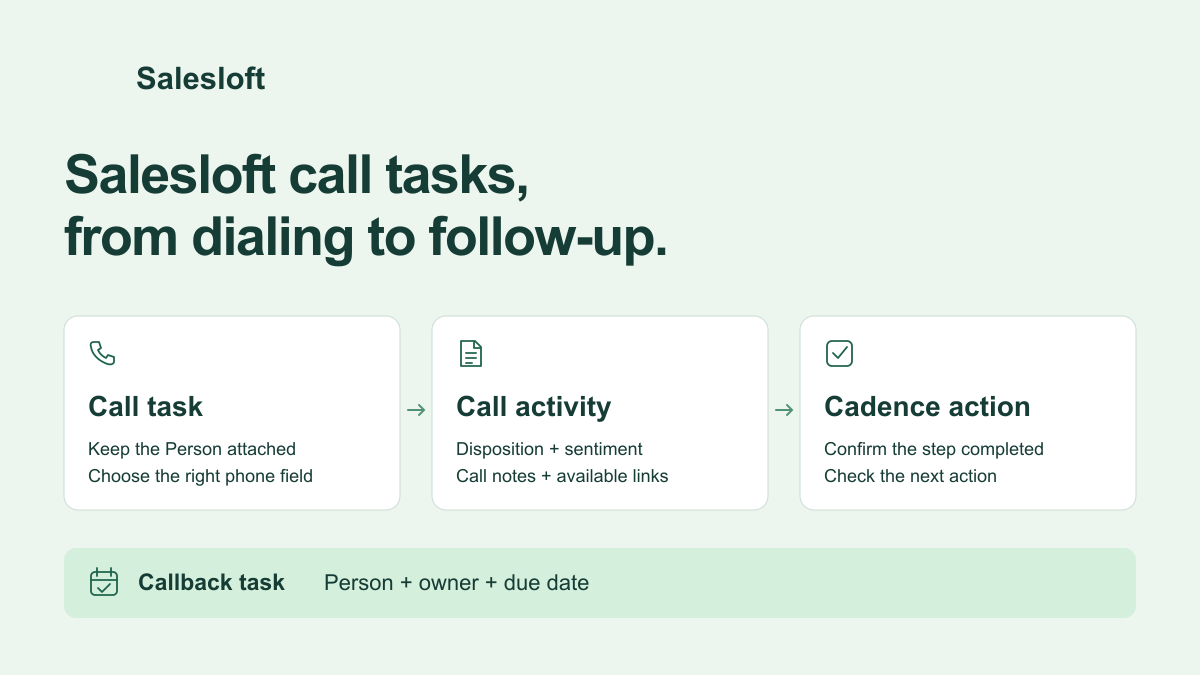
Trellus adds power and parallel dialing to supported Salesloft call-task and People workflows. Open the work your rep is ready to do, call with the Person and cadence context attached, then save the disposition, sentiment and notes. Check that the call activity saved, the intended task completed and the callback has an owner.
Start with the recorded Trellus and Salesloft walkthrough, then use the checklist below with your team's own cadence and outcome fields.
Start from the worklist you intend to finish
A People list and a call-task list serve different jobs. A People list supplies the audience. A call task also carries work to complete, with its Person, owner and available cadence context. Calling someone from People does not, by itself, mean a particular cadence step is finished. For the record definitions, see Salesloft People, cadences and call tasks.
For a re-engagement block, open the relevant Salesloft call tasks and review the people, order and due work before launching Trellus. Keep the Person record available so the rep can see why they are calling. If the audience is a People list instead, choose that deliberately and inspect any associated task separately.
Before the first call, confirm:
- The rep can access the People, tasks and cadence they plan to work.
- The intended mobile, work or mapped custom phone fields are available.
- The team's disposition and sentiment choices are available when saving a result.
- The signed-in Salesloft user can own the follow-up call task.
Choose power or parallel dialing for that list
Power dialing works through numbers one at a time. Parallel dialing attempts multiple numbers at once to find a conversation. Trellus offers both in supported Salesloft workflows; available parallel lines depend on the Trellus plan. The power and parallel dialer guide explains the modes.
Use power dialing when the rep needs to read each account, check the last interaction or tailor an opening before every attempt. Consider parallel dialing for a prepared calling block where the rep is ready for a live conversation. In either mode, verify the selected phone field rather than assuming every number belongs to the same person or is equally useful.
Save the call result before moving on
After the call, select the disposition that describes what happened and the sentiment your team uses. Add the useful conversation details: the reason for the call, the buyer's response and the agreed next action. Trellus can return the called number, disposition, sentiment, duration, note or summary, and available task or cadence context to Salesloft.
For example, a prospect asks for a call next Friday after reviewing a proposal. Save the relevant outcome and a short note about what they will review. Schedule the callback with its due date. If today's call task is finished, complete that task as well. A note that says “Friday” is useful context, but the due follow-up still needs its own task.
Separate the call log, completed work and recording
These are different things to inspect in Salesloft:
| Item | What to check |
|---|---|
| Call activity | The right Person has the attempted number, disposition, sentiment and useful notes. |
| Task or cadence step | The specific work you intended to finish is complete. A saved call alone is not enough to assume this. |
| Callback | A new Person-linked call task has the correct due date, assigned Salesloft user and available call summary. |
| Recording or transcript | The available Trellus link is in the Salesloft call note; open it with the access your team uses. |
Salesloft documents call-action completion separately from simply having call data. Trellus keeps the task or cadence context when it is available, but the result you need to verify is the actual task's completed state. If the activity saved and the task remains due, inspect that task before recording the same call again.
Trellus recordings are linked in the call note; they are not added as native Salesloft Conversations recordings. A manager looking for one should open the available note link. If your workflow specifically requires a recording in native Conversations, include that requirement when evaluating the setup.
Also distinguish the Person's logged activity from the Calls page used for reporting. Salesloft's call-data documentation explains that a logged call can exist without the separate call data record. Confirm where your team's reports read their call counts rather than treating every screen as the same total.
Make the callback actionable
Trellus can create a Salesloft call task linked to the Person, titled Trellus Callback Task, with a due date and available summary. It requires a Salesloft Person and an assigned Salesloft user. The callback is a new piece of follow-up work; it does not establish that the earlier cadence step is complete.
Reopen the Person and check the new task after scheduling it. Confirm the assignee, due date and context are enough for that rep to resume the conversation. If the buyer requested a particular time, retain that detail in the notes and confirm how your team schedules it; do not infer an appointment time from a due date alone.
Five checks for your first call block
Start with a test contact and phone number your team controls. Run one complete workflow before putting the whole list through it.
- Match the source. Write down the Person, selected number and originating task or cadence step. Confirm Trellus is working that record.
- Inspect the activity. Save the result, reopen the Person and check the disposition, sentiment, notes and available recording link.
- Check completion separately. If the rep finished the task, confirm that exact task or step is complete. Keep a record of any remaining due work.
- Find the callback. Schedule a follow-up and check its Person, assigned user, due date and summary in Salesloft.
- Check the reporting destination. Compare the saved activity with the report your manager actually uses. Confirm which records it counts before comparing totals.
If a save looks incomplete, the guide to confirming a CRM save helps separate the dialer's status from what is present on the destination record.
When the native Salesloft dialer is enough
Salesloft already provides calling. Its Dialer + Messenger product page describes one-click calls, voicemail drops, disposition and sentiment tracking, and live manager coaching. Keep that workflow if it meets your calling and recording needs. An additional dialer should solve a specific problem, such as working a prepared list with power or parallel dialing while keeping Salesloft context and follow-up attached.
To evaluate Trellus, bring one real worklist, your outcome fields and the callback owner to a demo. Use Trellus for Salesloft to review the supported workflow and start there.
Salesloft product and developer references checked October 21, 2026.


